
Nuva Ring Tracker Plus1.4.6 - Google Play
You'll be able to see results in few seconds.
Publisher Description
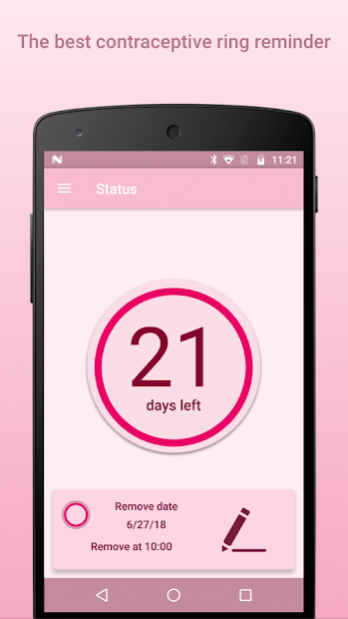
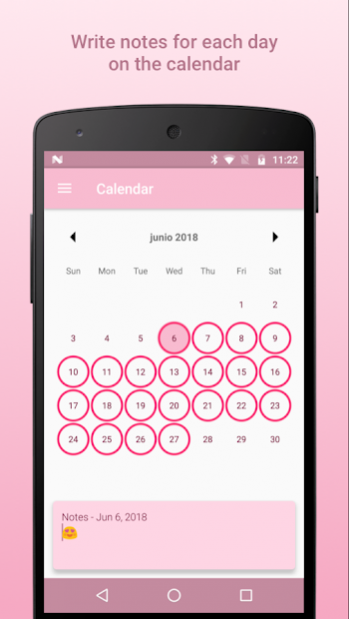
Nuva Ring Tracker Plus is the perfect app to keep track of your contraceptive ring birth control with a beautiful, intuitive, and easy to use design.
It's very simple to set up and use. You just have to select how many days you stay with the ring and the app will start notifying you when you'll have to insert or remove your contraceptive ring. In addition, you can always check the status of the current ring.
Nuva Ring Tracker Plus is the application you need to keep track of your ring: easy, effective, and free!
FEATURES WE LOVE
• Cycle overview
• Custom calendar with notes for each day
• Custom notifications
• What time to insert or remove your ring
• Total control over your cycle
• And much more…
PREMIUM FEATURES
• Ad free
Ad sponsors help us keep offering the free version. Becoming Premium you won't see ads anymore.
• Custom notifications
Premium users have access to advanced customization options like sounds, intervals, time, and more.
• Time to insert / remove the ring
Premium users have the option to select the exact time they want to insert and remove their rings.
REVIEW
If you like it and find it useful, please review the app! This means the world to us.
Your love will keep motivating us and it will also influence others users. Reviews are the best way to prove that this app is great. Please review us!
SUPPORT
If you have any feedback or run into issues, please contact us via email at support@cauim.co. We're always happy to help!
TROUBLESHOOTING NOTIFICATIONS NOT SHOWING
• Samsung Phones:
Step 1: Go to settings --> battery --> tap the menu button and choose “Battery optimization” --> tap the dropdown menu at the top of the screen and select “All apps”, then find "Contraceptive Ring Reminder", tap it and select “Don’t optimize”.
Step 2: Go to settings --> notifications, then find "Contraceptive Ring Reminder", then deactivate "block all" and also "show silently".
• Huawei Phones:
Step 1: Go to settings --> advanced settings --> battery manager --> protected apps, then find "Contraceptive Ring Reminder", and protect it. This is "whitelisting" the app so Huawei's overeager software doesn't shut it down for no reason.
Step 2: Go to settings --> apps --> advanced --> ignore battery optimizations, then find "Contraceptive Ring Reminder" and ignore it. Don't be tricked by the misleading wording, "ignoring" the app actually means to let it run, because you're telling the battery optimization function, aka Doze, to "ignore" that app.
Step 3: Go to settings --> notification panel & status bar --> notification center, then find the app, then activate "allow notifications" and also "priority display". You have to activate the priority part too to make sure you get notifications.
• Other Phones:
Please contact us via support@cauim.co so we can better help you.
---
NuvaRing is a trademark owned by Merck. There is no relation between Merck and the developers of this app.
Terms and Conditions: http://www.cauim.co/tos
Privacy Policy: http://www.cauim.co/privacy
About Nuva Ring Tracker Plus
The company that develops Nuva Ring Tracker Plus is Cauim Tech. The latest version released by its developer is 1.4.6.
To install Nuva Ring Tracker Plus on your Android device, just click the green Continue To App button above to start the installation process. The app is listed on our website since 2020-03-19 and was downloaded 0 times. We have already checked if the download link is safe, however for your own protection we recommend that you scan the downloaded app with your antivirus. Your antivirus may detect the Nuva Ring Tracker Plus as malware as malware if the download link to tech.nazca.nuvaringreminder is broken.
How to install Nuva Ring Tracker Plus on your Android device:
- Click on the Continue To App button on our website. This will redirect you to Google Play.
- Once the Nuva Ring Tracker Plus is shown in the Google Play listing of your Android device, you can start its download and installation. Tap on the Install button located below the search bar and to the right of the app icon.
- A pop-up window with the permissions required by Nuva Ring Tracker Plus will be shown. Click on Accept to continue the process.
- Nuva Ring Tracker Plus will be downloaded onto your device, displaying a progress. Once the download completes, the installation will start and you'll get a notification after the installation is finished.
Program Details
System requirements
Download information
Pricing
Version History
version 1.4.6
posted on 2020-03-19
. Bug fixes and stability improvements
version 1.4.0
posted on 2019-07-04
. Continuous usage! A lot of users asked us about this, and now you can insert another ring right after removing the previous one, or vice versa. You can also tell the app if you inserted or removed your ring before the date you were supposed to for whatever reason.
. Improved translations! We've improved all translations for better accuracy, please let us know if there are still any issues.
. Bug fixes and stability improvements.
Disclaimer
Official Google Play Link
We do not host Nuva Ring Tracker Plus on our servers. We did not scan it for viruses, adware, spyware or other type of malware. This app is hosted by Google and passed their terms and conditions to be listed there. We recommend caution when installing it.
The Google Play link for Nuva Ring Tracker Plus is provided to you by apps112.com without any warranties, representations or guarantees of any kind, so access it at your own risk.
If you have questions regarding this particular app contact the publisher directly. For questions about the functionalities of apps112.com contact us.
